The Ultimate Guide to Locker Locks: Types, Technology, Security, Selection, Installation and Smart Locker Systems
Suggested URL slug: /ultimate-guide-to-locker-locks/
Primary keyword: locker locks
Search intent: informational + commercial investigation + specification/procurement
Recommended meta title: Locker Locks: The Complete 2026 Guide to Types, Security & Selection
Recommended meta description: Learn every major type of locker lock—from keyed, combination and coin locks to keypad, RFID, NFC, Bluetooth and smart locker systems. Compare how they work, pros and cons, applications, installation, troubleshooting and selection criteria.
Featured snippet: What is a locker lock?
A locker lock is a mechanical, electromechanical or electronic device that secures a locker door and releases it only after an authorized user presents a valid credential such as a key, combination, PIN, RFID card, wristband, smartphone or biometric identifier. Modern locker locks may also support shared-use or assigned-use modes, audit trails, remote management and integration with access-control or workplace systems.
Locker locks have changed dramatically. A generation ago, most projects could be specified with a keyed cam lock, a built-in dial combination lock or a hasp for a padlock. Those solutions still matter, but they now sit beside battery-powered keypad locks, RFID readers, NFC and Bluetooth mobile credentials, biometric interfaces, wireless smart locks, centrally powered locker networks and cloud-managed storage systems.
For a locker manufacturer, architect, distributor, facility manager or OEM buyer, this creates opportunity—and complexity. The most expensive lock is not automatically the most secure. The newest technology is not automatically the easiest to operate. A physically robust lock can still be poorly matched to a weak door. A sophisticated RFID product can still be a poor choice if credential administration is badly designed. A cloud-connected smart locker system can create enormous operational value in a hybrid workplace, while the same system may be unnecessary for a small industrial changing room that only needs reliable assigned storage.
The correct way to specify locker locks is to treat the lock as one part of a complete storage system. The decision should consider the locker construction, latch geometry, user population, access workflow, threat level, environment, accessibility, maintenance resources, credential lifecycle, software integration and total cost of ownership.
This guide provides a manufacturer-level framework for doing exactly that.
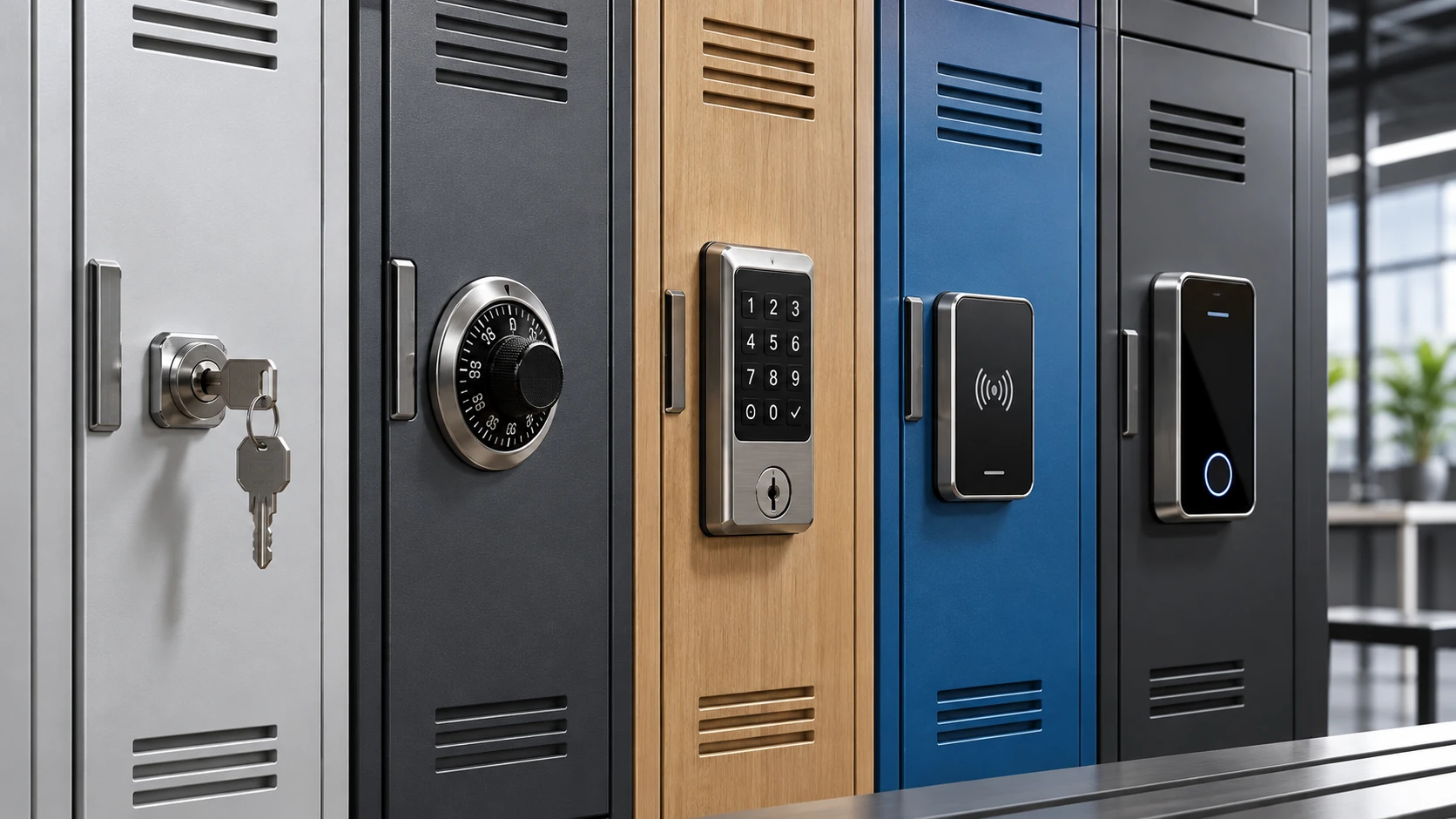
Image brief: A clean 16:9 industrial product illustration showing five locker doors in a row, each fitted with a different lock type: keyed cam, mechanical combination, keypad, RFID and mobile smart lock. Neutral metal and laminate finishes, realistic commercial setting, no text except small technical callouts.
A locker lock is the component that converts a storage compartment from an open enclosure into controlled-access storage. It normally performs two separate tasks: it determines whether a user is authorized, and it mechanically releases or restrains the door.
That distinction is important. The visible credential technology and the physical locking mechanism are not the same thing. An RFID locker lock may operate a cam. A keypad lock may drive a deadbolt. A smartphone-controlled locker may trigger a concealed wired latch. Two products can therefore use the same credential but behave very differently at the door.
A useful engineering model separates a locker lock into three layers.
The authentication layer answers: Who is allowed to open this locker?
Authentication can be based on something the user possesses, knows or is. A physical key, RFID card, wristband or smartphone is a possession credential. A PIN or mechanical combination is a knowledge credential. A fingerprint is a biometric credential. Some systems combine methods, such as RFID plus PIN.
The physical layer answers: What keeps the door closed?
The retaining component may be a cam, bolt, spring latch, hook, rotary latch, lift-handle linkage, multi-point rod system or concealed electromechanical latch. Its geometry determines how the lock interfaces with the frame and how well the door tolerates pulling, vibration and misalignment.
The management layer answers: How does the facility handle real life?
Real-life questions include: Who can override a forgotten code? What happens when a user loses an RFID card? Can a locker be reassigned without replacing hardware? Can administrators see which lockers are occupied? Can they open one remotely? What happens during a network failure? Can the system keep operating if the cloud is unavailable? How are batteries monitored? How is a stolen master credential revoked?
Traditional locks solve these issues through master keys, control charts and manual procedures. Modern systems may solve them through programming keys, administrator cards, apps, gateways and centralized software.
Locker locks overlap with cabinet and furniture locks, but locker applications create several distinctive requirements.
First, lockers are often high-cycle products. A day-use gym locker can be operated many times per day by unfamiliar users. Second, locker systems frequently need supervisory access, because staff must recover from forgotten codes, lost keys, abandoned belongings and emergencies. Third, many locker projects need shared-use behavior, where the credential-to-locker relationship is temporary rather than permanent. Fourth, locker hardware must integrate with the door, hinge and latch architecture of the locker itself.
Commercial manufacturers therefore differentiate locks for lift-handle lockers, single-point latches, box lockers, laminate doors, wet areas and smart locker applications rather than treating every lock as a universal component.
Several terms appear repeatedly throughout professional specifications.
Assigned use means a locker is dedicated to a specific user or defined group. Shared use, free use, day use or public use means a user temporarily claims an available locker and the locker becomes available again after release. Multi-user assigned means several authorized people may access one locker. Free selection means the user chooses any available locker. Dynamic allocation means software assigns the locker. Standalone means the lock makes access decisions locally. Networked means the lock communicates with software or a controller. Offline does not necessarily mean unmanaged; some offline systems can still be configured and audited using programming devices.
Understanding these terms prevents one of the most common specification errors: buying a credential technology without defining the required operating behavior.
There is no universal best locker lock.
A school with permanently assigned lockers may value rugged mechanical combinations and straightforward supervisory access. A premium fitness club may value waterproof RFID wristbands. A hybrid office may need mobile booking and automatic release rules. A hospital may prioritize auditable access. A factory may prioritize glove-friendly operation, simplicity and resistance to contamination.
The lock should therefore be chosen only after the facility has defined the storage workflow.
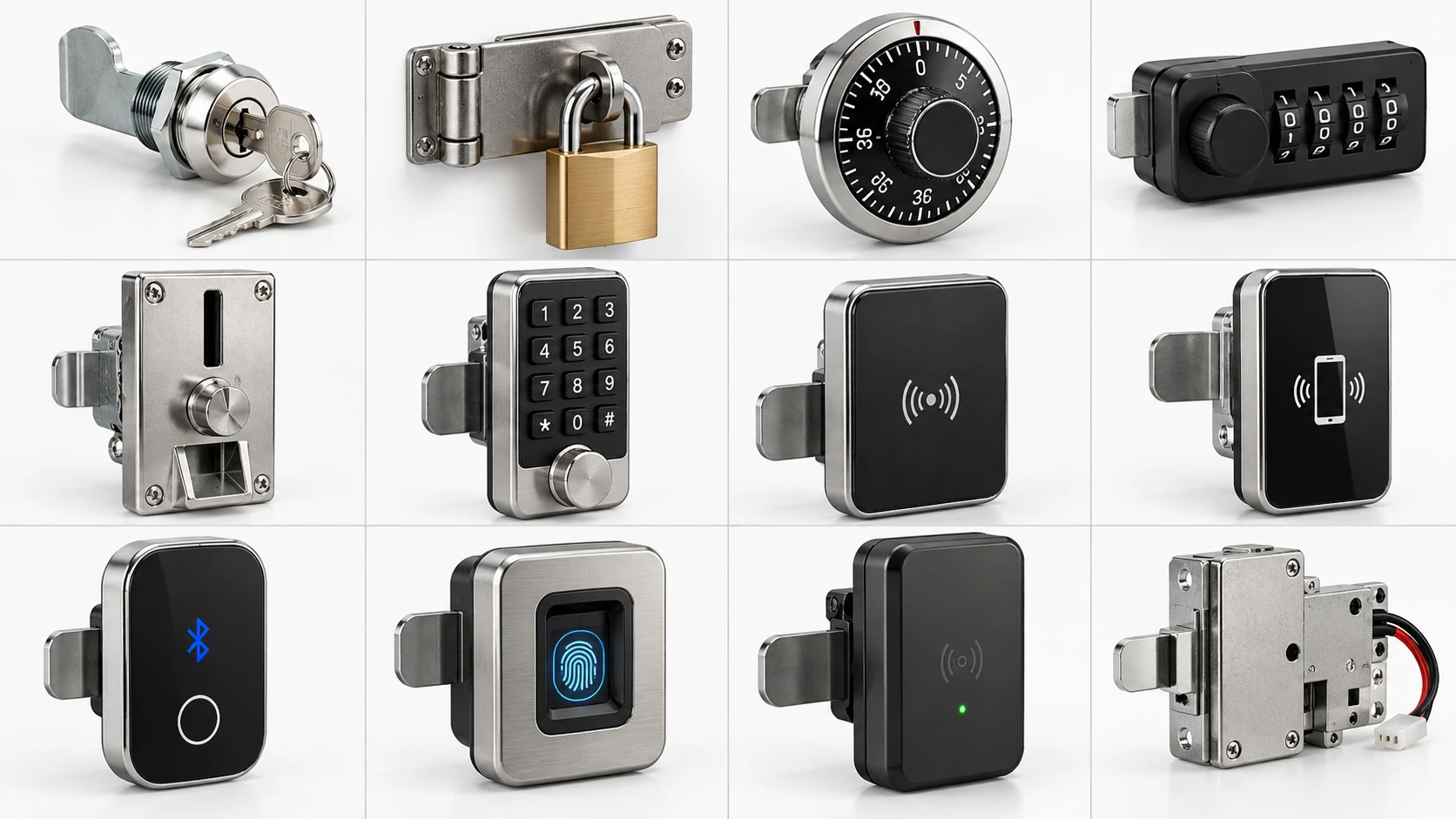
Image brief: 16:9 technical comparison board with twelve realistic locker lock forms arranged in a grid: keyed cam, hasp/padlock, built-in dial, multi-wheel combination, coin lock, keypad, RFID, NFC, Bluetooth/mobile, biometric, wireless smart lock and wired networked latch. White background, engineering-catalog style, no brand logos.
Featured snippet: What are the main types of locker locks?
The main locker lock types are keyed cam or cylinder locks, hasp-and-padlock systems, built-in dial combination locks, mechanical multi-wheel combination locks, coin or token locks, electronic keypad locks, RFID locks, NFC or Bluetooth mobile locks, biometric locks and networked smart-locker locking systems.
Locker locks can be classified by credential, power source, physical latch and management model. A useful buying comparison is shown below.
| Locker lock type | User credential | Power | Typical use mode | Management level | Main strength | Main trade-off |
|---|---|---|---|---|---|---|
| Keyed cam/cylinder | Physical key | None | Assigned | Low | Simple, inexpensive, familiar | Lost-key administration |
| Hasp + padlock | Padlock key/code | None | Assigned or temporary | Very low | Facility avoids issuing locks | User-supplied lock quality varies |
| Built-in dial combination | Dial sequence | None | Assigned | Low–medium | No user key or battery | Forgotten combinations |
| Mechanical multi-wheel | 3–4 digit code | None | Assigned/shared | Low–medium | Keyless and battery-free | Manual reset/recovery |
| Coin/token lock | Coin/token + key | None | Shared | Medium | Simple public-use workflow | Key/coin handling |
| Electronic keypad | PIN | Battery/wired | Assigned/shared | Medium–high | Easy code changes | Battery and code management |
| RFID | Card/fob/wristband | Battery/wired/batteryless | Assigned/shared | Medium–high | Fast contactless use | Credential compatibility/security |
| NFC/mobile | Smartphone/wallet | Usually powered lock | Assigned/shared | High | Digital credential lifecycle | Phone/platform dependency |
| Bluetooth | Smartphone/app | Usually battery | Assigned/shared | High | Flexible mobile interaction | App, battery and cyber requirements |
| Biometric | Fingerprint/other | Battery/wired | Usually assigned | Medium–high | No carried credential | Environment/privacy considerations |
| Wireless smart lock | Digital identity | Battery | Dynamic | High | Retrofit + central visibility | Battery + software dependency |
| Centrally powered smart latch | App/card/PIN/QR | External power | Dynamic/workflow-based | Very high | Real-time control and automation | Cabling/controller complexity |
A professional specification should evaluate each lock in four dimensions.
Credential: key, code, card, wristband, phone, biometric or hybrid.
Latch: cam, deadbolt, spring latch, hook, rotary latch or linkage.
Power: mechanical, battery, batteryless energy harvesting or centrally powered.
Management: standalone, portable-programmer managed, wireless connected or hardwired networked.
These dimensions explain why two “RFID locker locks” can be completely different products. One may be a standalone battery lock with no network. Another may communicate wirelessly with cloud software. A third may be a centrally powered latch with a separate reader.
Mechanical locks remain the correct answer for many projects because they eliminate batteries, networking and software. Their lifecycle can be exceptionally predictable, and trained maintenance teams can repair or replace them with simple tools.
Electronic locks are valuable when the facility needs to reduce key administration, support temporary users, integrate existing credentials, record events or automate assignments. Their value is operational, not merely technological.
Standalone locks are attractive when the facility wants electronic convenience without IT infrastructure. The lock stores codes or credentials locally and is configured at the door.
Connected systems provide centralized visibility. Depending on architecture, they can support remote openings, occupancy status, reservations, audit trails, user provisioning, automatic expiration, alarms and API integration.
The more centralized the system becomes, the more procurement should involve IT and cybersecurity stakeholders in addition to architects and facility managers.
Keyed cam and cylinder locks are among the simplest and most widely used locker security devices. They remain common in employee lockers, schools, factories, offices, cabinets and OEM furniture because they are compact, economical and easy to integrate.
A typical cam lock passes through a prepared hole in the locker door. The cylinder is retained by a nut, clip or mounting plate. A metal cam is fixed to the rear spindle. When the correct key rotates the cylinder, the cam rotates—commonly by 90 or 180 degrees—and moves behind or away from the frame or strike.
The internal cylinder may use wafers, discs, pins or another mechanism. The security level varies substantially. A low-cost generic cam lock and a restricted-key high-security cylinder are both “keyed locker locks,” but their key control and resistance to manipulation are not equivalent.
Keyed locks have almost no learning curve. They require no batteries, firmware, network, credential enrollment or user training. They are easy to stock as spare parts and can be replaced quickly. For permanent assignments, the relationship between user and locker is also easy to understand: one locker, one key.
Master-key systems can give supervisors authorized access across many lockers. Keyed-different systems maintain individual user separation, while keyed-alike groups can simplify access where multiple doors belong to the same user or department.
The primary cost is not the lock—it is key administration.
Keys must be issued, recorded, returned and replaced. Lost keys can create both inconvenience and security risk. If users leave an organization without returning keys, management must decide whether to accept the risk, rekey the cylinder or replace the lock. Large key inventories create recurring administrative work.
Master-key convenience also creates concentration risk. A lost uncontrolled master key can affect many lockers at once.
Keyed cam locks are especially suitable for long-term employee storage, industrial lockers, low-complexity school or staff applications, service cabinets and projects where the facility wants a low upfront cost and has an existing key-control process.
They are less suitable for very high-turnover public day-use lockers where users change constantly.
Measure the door thickness, cutout size, cam length, cam offset and required rotation before ordering. The most common retrofit failure is choosing a lock whose cylinder fits the hole but whose cam does not engage the frame correctly.
Confirm whether the key should be removable in both positions or only in the locked position. For shared facilities, key-retaining behavior can be useful because the user cannot remove the key without securing the locker.
Metal doors may use clips or anti-rotation flats. Thicker laminate or phenolic doors may require a longer body or extension components.
If the key turns but the door does not open, inspect the cam connection and frame alignment. A loose cam screw or nut can allow the cylinder to rotate without moving the retaining arm. If the key is difficult to turn only when the door is closed, door pressure or misalignment is likely loading the cam.
If keys wear rapidly, inspect both key quality and cylinder contamination. In dusty or corrosive environments, a lock selected for ordinary office use may not be suitable.
Can keyed locker locks be master keyed? Yes. Many commercial systems support master-key or control-key hierarchies, but the exact keying architecture depends on the cylinder family.
Should every locker have a unique key? Not necessarily. Assigned personal lockers normally use keyed-different cylinders; departmental or multi-door applications may intentionally use keyed-alike groups.
Are cam locks high security? The cam format alone does not define security. Security depends on the cylinder, key control, cam engagement, door strength and frame construction.
A hasp-and-padlock system moves much of the credential responsibility from the locker manufacturer to the padlock. The locker provides an eye, loop, hasp or handle opening; the user or organization supplies the padlock.
When the locker door closes, the handle or hasp aligns with a fixed opening. Passing a locked padlock shackle through the opening prevents the handle or latch from moving far enough to release the door.
On recessed-handle metal lockers, the padlock often secures the lift mechanism. On simple cabinets, the hasp may directly bridge the door and frame.
The hardware built into the locker is simple and inexpensive. Users can bring their own padlocks, eliminating facility key issuance. A failed or forgotten padlock can be cut off and replaced without changing the door hardware.
Padlocks are also flexible. A facility can standardize on keyed, combination, master-keyed or even electronic padlocks without redesigning the locker.
Security becomes inconsistent if users bring arbitrary consumer padlocks. A heavy padlock on a thin hasp does not create a strong system; conversely, a strong locker door can be compromised by a small exposed shackle.
Forgotten combinations and lost padlock keys remain operational issues. Facilities should also plan how they will identify abandoned lockers and what authorization is required before cutting a lock.
Hasp systems work well in factories, construction environments, schools, warehouses, budget fitness facilities and any setting where users already carry personal locks.
They are also useful where locker ownership changes frequently but the organization does not want an electronic management platform.
The padlock shackle diameter must fit the hasp. The hasp opening should not create unnecessary leverage. The locked padlock should not interfere with adjacent locker doors or handles.
If the locker uses sheet metal, the hasp should transfer load into reinforced structure rather than relying on a small unsupported tab.
If users report that padlocks are difficult to insert, inspect alignment between the door, handle and hasp. Bent doors are common in high-abuse environments. If shackles are frequently cut or damaged, evaluate whether the application needs a concealed-shackle or built-in lock instead.
Should a facility allow user-supplied padlocks? It can be cost-effective, but administrators lose control over lock quality and may need a clear abandoned-lock removal policy.
Can padlock lockers still have emergency management access? Yes, by standardizing on master-keyed institutional padlocks or by using an authorized cutting procedure.
Is a thick shackle always more secure? No. Overall security also depends on the hasp, body, cylinder, shackle exposure and locker construction.
Built-in dial combination locks are iconic in school locker systems, but their continued use is based on more than tradition. They provide keyless user access with no battery, no software and a well-understood administrative model.
A dial lock usually contains a spindle, drive cam and a series of internal wheels. Turning the dial in a prescribed sequence rotates the wheel pack. Each wheel has a gate or notch. When the correct combination is entered, the gates align and allow a fence or lever to move so the bolt can retract.
Commercial built-in locker versions are engineered for specific locker mechanisms. Some operate spring bolts for automatic locking; others use deadbolts or interact with a lift-handle assembly. Institutional product families may include right-hand and left-hand versions.
The user does not need a key. The facility does not need batteries. Well-designed institutional products can support supervisory control keys and combination-change procedures. Some commercial locker locks are supplied with multiple preset combinations that can be rotated when lockers are reassigned.
Mechanical dial locks are also highly familiar in education, reducing training requirements.
Users forget combinations. Dialing requires more dexterity and time than tapping an RFID credential. In high-turnover environments, changing or recovering combinations can consume staff time.
These locks are also closely tied to locker hardware geometry. A lock designed for a lift-handle locker is not automatically interchangeable with one designed for a single-point or box locker.
Built-in dial locks remain strong choices for schools, universities, employee lockers and institutional environments where lockers are assigned for weeks, months or years and the facility wants keyless access without electronics.
Confirm the exact locker mechanism before selecting the lock. Identify hinge side, bolt direction, door thickness and whether the locker uses a lift handle, horizontal latch or rotating single-point latch.
Institutional models often have very specific compatibility. Never purchase large quantities based only on the appearance of the front dial.
A correct combination may fail if the door is loaded against the bolt. Ask the user to relieve pressure on the door while dialing. If combinations appear unreliable across many locks, check whether users understand the dialing sequence and whether worn mechanisms require service.
Control keys should be inventoried and restricted. A combination-management system loses much of its security value if control keys circulate without accountability.
Do built-in combination locks need batteries? No. Traditional dial models are fully mechanical.
Can the combination be changed? Commercial institutional models often provide a controlled method for changing or rotating combinations, but the exact procedure is model-specific.
Are they suitable for day-use gyms? They can work, but multi-wheel shared-use locks or electronic systems are usually more intuitive when each locker is used by many different people per day.
Mechanical multi-wheel combination locks use several rotating number wheels rather than a circular dial. They are now common in gyms, offices, schools and leisure facilities because they combine keyless operation with battery-free simplicity.
Each wheel corresponds to one digit. On a four-wheel lock, the user aligns four digits in the code window. Internally, each wheel has a gate. When every gate is aligned, the release mechanism can move and the knob or handle can rotate the cam or bolt.
Commercial locker versions often add a reset mechanism, code-finding feature or management override. Some products can be configured for assigned use, where one code remains active, or shared use, where a temporary user sets a code and the lock resets when the locker is released.
The major advantage is that there are no user keys and no batteries. Four decimal wheels provide 10,000 possible numeric combinations from 0000 through 9999, although real security also depends on mechanical design and user behavior.
These locks can be intuitive: set code, turn knob, scramble the wheels. In shared-use versions, the next user can select a new code without staff reprogramming the lock.
They are also attractive for retrofit projects because many models use cam-lock style footprints and do not require wiring.
Forgotten codes are the most common support problem. Facilities therefore need a controlled recovery method. A code-finding tool or master key improves usability but must itself be protected.
Small wheels can be difficult for some users with limited dexterity, gloves or visual impairments. Mechanical wear, dirt and chemical contamination can also affect operation in demanding environments.
Multi-wheel combination locks are particularly strong for gyms, changing rooms, office day lockers, employee storage and educational environments where a facility wants shared or assigned keyless use without electronics.
Wet-area versions are available from some manufacturers, but buyers should confirm the actual environmental rating and materials rather than assuming every mechanical combination lock is suitable for pools or showers.
Check door thickness and spindle or nozzle length. Confirm 90-degree versus 180-degree movement, clockwise or counterclockwise locking, cam position and whether the same lock can be handed left or right.
A retrofit may be easy if the existing door already has a compatible cam-lock opening. On timber, HPL, compact laminate or phenolic doors, backing plates may be required to distribute load.
If the wheels move correctly but the knob will not rotate, relieve pressure from the door. If a code has been forgotten, use only the manufacturer's approved code-recovery process; forcing the lock can damage the door as well as the mechanism.
If users repeatedly forget codes in a shared facility, the problem may be operational rather than mechanical. Clear instructions, locker numbering and a simple staff recovery process often produce more value than changing hardware.
Are four-digit mechanical locker locks secure? They can be appropriate for ordinary personal storage, but the number of combinations is only one part of security. Build quality, door strength, code privacy and management override also matter.
Can one mechanical combination lock work for both shared and assigned lockers? Some commercial products support both modes, but not every model does.
Do they require maintenance? They require no battery maintenance, but periodic inspection for wear, contamination, loose hardware and door misalignment is still good practice.
Coin and token locks are classic shared-use solutions for swimming pools, leisure centers, amusement parks, public changing rooms and other visitor facilities. They combine temporary access with either a refundable deposit or a usage fee.
In a coin-return or collateral system, the user inserts the required coin or token before the lock will secure. The key can then be removed. When the user returns, unlocks the door and completes the cycle, the deposit is returned.
In a coin-retain, coin-collect or payment system, the user follows a similar process but the coin is retained in a collection box. The facility can therefore charge per use.
Some lock families also support cards or configurable coin sizes.
The workflow is easy to understand and independent of a database, app or network. A refundable deposit encourages users to return the key and vacate the locker. A retain system can generate revenue or recover operating costs.
Coin locks are especially useful for occasional visitors who may not have a membership credential.
There are still physical keys to maintain. Coin mechanisms add moving parts and may require collection, cleaning and servicing. Cash-handling procedures can create administrative burden.
The growing use of cashless payment and mobile credentials may also make traditional coin-only systems less convenient in some markets.
Swimming pools, spas, leisure centers, visitor attractions, transport facilities and public changing areas remain the main applications. The model is strongest when temporary use is more important than individual identity.
Coin locks are physically larger than basic cam locks. Door preparation, internal clearance, coin box space, key movement and handedness must all be confirmed. Wet-area versions should be selected where humidity, chlorine or frequent cleaning is expected.
Typical problems include jammed coins, worn keys, contaminated mechanisms, misaligned doors and users inserting incorrect currency. Facilities should keep spare keys, cylinders and approved cleaning tools available.
What is the difference between coin return and coin retain? Coin return gives the deposit back when the locker is released; coin retain keeps the payment.
Are token locks better than coin locks? Tokens avoid dependence on a specific currency and can be issued by the facility, but they still require distribution and collection logistics.
Can coin locks be converted to RFID? Often yes, but retrofit feasibility depends on the existing door cutout and the replacement lock's footprint.
Electronic keypad locks are one of the most versatile upgrades from mechanical locking. They preserve the familiar idea of a numeric code while adding programmable behavior, management hierarchy, low-battery warnings and sometimes event logging or network connectivity.
The user enters a PIN on a keypad or touch interface. A microcontroller compares the code with stored authorization data. If valid, the electronics energize a motor, gear train or solenoid that retracts or releases the mechanical latch.
Depending on design, the user may then pull the door open automatically or turn a knob that moves the cam.
In assigned use, the lock stores one or more credentials for a specific user, department or group. The same PIN continues to work until an administrator changes it.
In shared use, the locker is initially available. A user chooses it, enters a temporary code and locks the door. The same code opens it. After successful release, the temporary code is deleted and the locker becomes available to the next user.
This behavior is fundamental for gyms, spas, hybrid offices and visitor lockers.
Keypad locks eliminate physical user keys and cards. Codes are inexpensive to issue because nothing physical has to be manufactured. A facility can support temporary users without handing out credentials.
Many commercial products support user, technician, sub-master and master codes. Some include lockout or penalty time after repeated incorrect attempts. Advanced versions can provide scheduled unlock, audit records, reservations or app-based management.
Users can forget, share or observe PINs. Frequently pressed keys may reveal wear patterns over time. Batteries add a maintenance obligation in standalone products.
A keypad can also create accessibility issues if buttons are small, high-force, low-contrast or positioned outside accessible reach ranges.
Electronic keypad locks are strong choices for offices, gyms, schools, hospitality, coworking spaces, health clubs, staff lockers and temporary storage where users may not already carry an RFID credential.
They are particularly effective where a facility needs shared-use behavior but wants to avoid issuing cards or wristbands.
Electronic front units often require multiple mounting holes rather than a single cam-lock hole. Check the manufacturer's template. Confirm battery compartment clearance, rear-unit orientation, pull-handle requirements, door thickness and latch engagement.
For retrofit work, verify whether the lock covers the old opening and whether the existing door construction is stiff enough for the new mounting pattern.
The keypad lights but the door will not open: the electronics may be working while the latch is mechanically loaded. Push or pull the door slightly to relieve pressure.
The keypad is dead: check battery condition, battery contacts and emergency-power procedure.
The code is rejected: verify shared versus assigned mode, credential length, lockout state and whether another administrator has reprogrammed the lock.
The lock opens but will not relock: inspect cam position, deadbolt alignment and door-closed geometry.
How long do keypad lock batteries last? There is no universal answer. Battery life depends on lock design, battery chemistry, usage cycles, temperature, motor load and wireless features. Use the manufacturer's tested cycle or time specification only for that specific model.
What happens if the batteries die? Professional products may provide external emergency power, an electronic management key, a mechanical override or another recovery method. This must be confirmed before purchase.
Are keypad locks suitable for shared day lockers? Yes, if the lock supports a shared-use mode that clears or resets the temporary user credential after release.
RFID locker locks have become a major commercial category because they provide fast contactless operation and can often reuse credentials that users already carry for building entry, membership or campus services.
An RFID credential contains an integrated circuit and antenna. When it enters the reader's field, the lock or reader obtains credential data and uses it to make or request an authorization decision. If access is approved, the actuator releases the locker.
The credential can take the form of a card, key fob, wristband or other form factor. In wet environments, wristbands are especially useful because users do not need to carry a key or phone.
One of the most important procurement lessons is that “RFID” does not describe one uniform security architecture.
Locker systems may support different frequencies, card standards and credential technologies. Common modern contactless systems include technologies associated with ISO/IEC 14443, while some applications support ISO/IEC 15693 or legacy 125 kHz credentials.
Security depends on how the credential is authenticated and how keys are managed. An implementation that checks only an easily copied identifier is different from one using cryptographic mutual authentication.
For security-relevant projects, buyers should ask which credential technologies are supported, whether secure cryptographic authentication is used, how keys are diversified and protected, how lost credentials are revoked, and whether the system can migrate to stronger credentials in the future.
RFID is fast and intuitive. Users simply present a credential. There is no code to remember. Facilities can issue rugged wristbands for aquatic environments or reuse employee badges and campus cards when compatibility permits.
In centrally managed systems, lost credentials can be revoked without changing the lock itself. RFID can also support one identity across building access, payment, printing and lockers.
Credential compatibility must be tested rather than assumed. Two cards that look identical may use different technologies or security configurations.
Metal locker doors can affect antenna performance. Reader placement, spacers and distance between neighboring readers may matter. Battery-powered RFID locks also consume energy every time they read and actuate.
The facility must manage the credential lifecycle: enrollment, issuance, revocation, replacement and decommissioning.
RFID is particularly effective in gyms, fitness clubs, universities, corporate offices, healthcare, spas, attractions and any facility where users already carry an access badge or wristband.
Test credential read performance on the actual locker material. Metal surfaces can detune antennas, so some products require a spacer or specifically engineered reader geometry.
Check the minimum distance between adjacent readers in dense locker banks. Validate every credential family the customer intends to use, including older badges.
If one credential fails but others work, the problem is probably credential authorization, compatibility or damage. If many credentials fail on one locker, inspect reader power, antenna environment and lock configuration.
If read distance changes after installation, check metal shielding, nearby electronics and mounting spacers. If the lock authenticates successfully but the door remains closed, troubleshoot the mechanical latch separately from the RFID reader.
Can an existing employee badge open lockers? Often yes, if the reader supports the badge technology and the system's credential architecture permits integration. Compatibility must be validated.
Is MIFARE Classic appropriate for every security-sensitive locker project? No. NXP itself directs security-relevant applications toward product families such as MIFARE DESFire and MIFARE Plus. System design, not just card branding, determines security.
Can RFID locker locks work offline? Yes. Many standalone products store authorization locally. Other RFID systems are networked for centralized monitoring and control.
Smartphones increasingly serve as locker credentials. Mobile locker access can use NFC, Bluetooth Low Energy, wallet-based credentials, QR codes or app-mediated authorization. These technologies can reduce physical credential issuance and connect locker access directly to a user's digital identity.
NFC is designed for short-range interaction. A user typically brings the phone or wearable close to the reader and performs a tap-style action. This interaction is intuitive because it resembles contactless payment and modern access-control workflows.
NFC can be used with dedicated apps or, depending on ecosystem and hardware, with credentials stored in mobile wallets.
BLE can support communication at greater range than a close tap. An app can discover and interact with a nearby locker, or a system can use BLE as the wireless management channel between locks and gateways.
However, Bluetooth should be treated as a communications technology with a set of security capabilities, not as an automatic guarantee of secure implementation. Device authentication, pairing, credential protection, authorization logic and application security all matter.
Mobile credentials can be issued remotely and can expire automatically. There is no need to manufacture and distribute a physical card. A hybrid office can link a locker reservation to the same app used for desk booking or building services.
A smartphone can also display the assigned locker number, reducing the common problem of users forgetting which locker they claimed.
Not every user has a compatible or charged phone. Mobile access may depend on an app, operating-system permissions, Bluetooth settings, NFC availability, wallet support or cellular/internet connectivity during enrollment.
Facilities should therefore define a fallback credential for visitors, dead phones and users who cannot or do not want to use a personal mobile device.
Corporate offices, coworking spaces, premium gyms, hospitality, visitor storage and smart buildings benefit most when mobile identity is already part of the broader facility experience.
Mobile locker projects require both physical installation and digital deployment. Test radio performance on the actual locker. Confirm whether users must install an app. Define account provisioning, invitation, expiration and support workflows before launch.
Common problems include disabled Bluetooth or NFC, outdated app versions, expired mobile credentials, phone permission settings, poor radio placement, incorrect locker assignment and failed account synchronization.
The operational team needs a troubleshooting decision tree that separates phone problem, credential problem, network problem and mechanical lock problem.
Does a Bluetooth locker lock always require internet? No. BLE communication can be local, but the wider system may require internet for provisioning, synchronization, remote management or cloud services.
Can a smartphone replace an RFID card? In some systems yes, but the lock and credential platform must support the selected mobile technology.
Should mobile be the only credential? It can be, but commercial facilities usually benefit from a documented fallback for visitors, dead batteries and accessibility needs.
Biometric locker locks authenticate the user through a biological characteristic rather than a key, card or remembered code. Fingerprint recognition is the most common locker-oriented biometric technology, although smart locker platforms may also integrate face recognition or other identity systems at a central terminal.
During enrollment, the biometric reader captures a fingerprint or other feature and creates a mathematical template. During access, a new scan is compared with the stored or referenced template. If the match score satisfies the system's threshold, the lock releases.
The important point is that a professionally designed biometric system should work with a template rather than simply storing a photographic image as the credential. Storage location, encryption, deletion and privacy policy should be reviewed as part of the system design.
A biometric credential cannot be left at home in the same way as a key or badge. Users do not have to remember a PIN. This can create a very smooth experience for premium employee lockers, personal storage and controlled equipment applications.
Biometrics can also reduce credential sharing because the credential is associated with the enrolled person rather than with a transferable card or code.
Biometric performance is highly dependent on environment and user condition. Wet fingers, dry skin, dust, gloves, cuts, oils and cleaning chemicals can reduce fingerprint performance. That matters in swimming pools, factories, kitchens, laboratories and medical settings.
Privacy and regulatory obligations are also more serious than with ordinary locker PINs. Organizations should identify what biometric data is collected, where it is stored, who can administer it, how long it is retained and how it is deleted when a user leaves.
Biometrics are most attractive for premium office storage, controlled staff lockers, high-value equipment lockers and projects where users do not want to carry credentials. A central biometric terminal may also be appropriate for smart locker systems where the individual locker door uses a simpler electronic latch.
Sensor height and orientation should be accessible to the intended population. Avoid positions where water, direct sunlight, abrasive cleaning or repeated impact will affect the sensor.
For central terminals, consider queuing. A biometric terminal that controls 200 lockers may become a bottleneck during shift changes if user identification is slow.
Repeated false rejects may indicate poor enrollment rather than failed hardware. Re-enroll users under realistic conditions and provide more than one finger when supported.
Always define an alternate access path for injured users, sensor failure and emergencies. A biometric system without a controlled fallback is operationally incomplete.
Are fingerprint locker locks suitable for swimming pools? Only if the specific product is designed for the environment and its sensor performs reliably with wet users. RFID wristbands are often easier in aquatic settings.
Do biometric locks eliminate all credentials? They eliminate carried credentials for normal use, but administrators still need management credentials and recovery procedures.
Are biometrics automatically more secure than RFID? No. Security depends on the implementation, template protection, anti-spoofing, fallback method and overall system architecture.
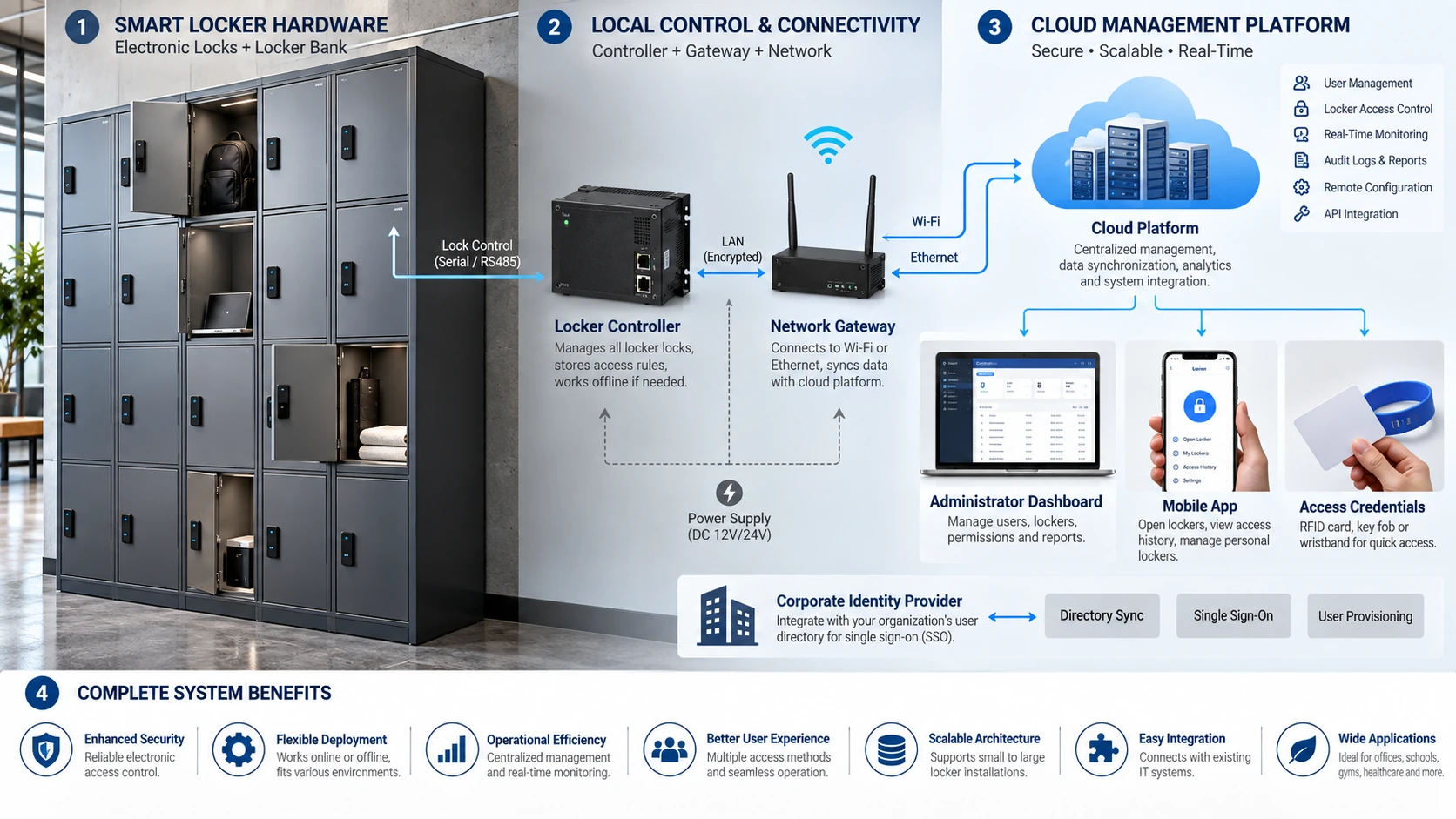
Image brief: Detailed 16:9 system architecture illustration: locker bank with electronic locks, local controller/gateway, Wi-Fi/Ethernet, cloud platform, admin dashboard, smartphone app, RFID credential and corporate identity provider. Clear data-flow arrows, enterprise technical style.
A smart locker system is more than an electronic lock. It combines physical locker hardware with digital identity, software rules, allocation logic, monitoring and integration. In advanced projects, the actual lock on the door may be only one small component of the overall solution.
A practical architecture usually includes five layers.
Locker hardware provides the physical compartment, hinges and door.
Electronic lock or latch secures the compartment and reports or changes state.
User interface may be a lock-mounted reader, keypad, touchscreen, smartphone app or corporate badge.
Controller or gateway connects groups of locks to the management layer.
Management software stores users, policies, reservations, audit information, locker status and integration rules.
Some platforms distribute intelligence into each battery-powered lock. Others use simple wired latches controlled by a central cabinet controller. Both approaches can be valid.
A standalone smart lock provides electronic access without continuous network communication. It may store credentials locally and be configured with a programming key, management card, NFC device or smartphone.
This architecture is attractive for retrofit because no cabling is required. It can also continue operating independently of network availability.
The trade-off is that administrators may not have real-time visibility unless locks are periodically synchronized or connected through an optional wireless layer.
Wireless smart locks combine the retrofit advantages of batteries with central management. They may use proprietary radio, BLE, Wi-Fi or another wireless link to a nearby gateway.
Potential capabilities include occupancy reporting, remote opening, low-battery status, reservation assignment, audit retrieval and alarm reporting.
Battery life becomes a system-design variable. Radio communication frequency, wake-up strategy, signal strength and motor use can materially affect maintenance intervals.
Hardwired systems distribute power and communication to locker locks from controllers. Because individual locks do not rely on replaceable batteries, they can be attractive for large permanent installations.
They can support continuous bidirectional communication and immediate state changes, but installation is more complex. Cable routing, controller capacity, service access and power-loss strategy must be designed with the locker furniture.
In a traditional locker bank, one person may own one locker indefinitely. Smart systems can change that model.
A user can authenticate at a terminal or phone and request storage. Software assigns an available locker based on size, location, accessibility, department or policy. When the user releases the locker, it immediately returns to the shared pool.
This model is valuable in hybrid offices where daily building occupancy is lower than total headcount. The economic benefit comes from higher storage utilization, not simply from having a more advanced lock.
Connected platforms can allow users to reserve a locker before arrival. They can also release lockers automatically after a defined time, prevent users from occupying multiple compartments, create visitor assignments or apply different rules to different teams.
For asset workflows, smart lockers can support package pickup, laptop exchange, tool issue, document handover and spare-parts distribution.
The strongest enterprise projects integrate lockers with systems users already know. Examples include building access credentials, corporate identity directories, desk-booking platforms, workplace apps, HR systems and mobile credentials.
Integration reduces duplicated user administration. If an employee is disabled in the corporate identity system, locker authorization can also be removed according to policy.
Networked lockers provide visibility and control that standalone locks cannot match. Administrators can see usage, identify long-held lockers, support users remotely and use data to plan storage capacity.
For IT and equipment lockers, workflow automation can be even more important than access control.
The system introduces software lifecycle, cybersecurity, network dependency, licensing and vendor dependency. A locker is durable furniture that may remain in service longer than a typical software platform, so long-term support and interoperability matter.
Hybrid offices, universities, hospitals, high-end fitness facilities, corporate campuses, logistics, parcel delivery, IT asset management and multi-site organizations can justify smart locker systems when centralized operations create measurable value.
Map power, networking and gateway locations before furniture production. If locks are battery powered, determine service access and replacement strategy. If centrally wired, confirm controller capacity and cable paths for every compartment.
Define what happens during network and power failure. Good systems provide a documented offline or emergency mode instead of simply becoming unusable.
When a connected locker fails, separate the fault into layers: credential, user account, application, network, gateway/controller, lock electronics, mechanical latch or door alignment.
This layered approach is dramatically faster than replacing locks whenever a user reports “my locker won't open.”
What makes a locker “smart”? A smart locker combines electronic locking with software-based identity, allocation, monitoring or workflow management.
Do smart lockers need cloud software? No. Systems can be cloud-hosted, on-premises, standalone or hybrid.
Can smart lockers work if the internet is down? Some can continue using local or offline authorization. This capability should be verified as a formal requirement.
Credential technology gets most of the attention, but mechanical geometry often determines whether a locker feels reliable in daily use. Understanding latch types makes specifications much more accurate.
A cam is a rotating metal arm attached to the lock spindle. When the user turns the key, knob or motorized mechanism, the cam moves behind the frame to secure the door.
Cams are compact and adaptable. Straight, offset, cranked and hook-shaped cams can accommodate different frame depths. Rotation may be 90 or 180 degrees and can be clockwise or counterclockwise.
The main engineering challenge is engagement. Too little overlap produces weak retention. Too much can prevent closing or create excessive friction.
A deadbolt moves positively into the frame or strike and remains there until intentionally retracted. Motorized deadbolts are common in electronic shared-use locks because the system can drive the bolt after a valid command.
A deadbolt generally provides a clearly defined locked state, but it needs accurate alignment. If the door is warped or loaded, friction on the bolt can increase motor demand or prevent retraction.
A spring latch has an angled or spring-loaded bolt that can be pushed inward as the door closes and then automatically extends. This makes it useful for assigned-use lockers that should relock simply by closing the door.
Because the latch action is automatic, the user does not need a second locking operation.
Hook latches engage behind a strike or pin and can tolerate certain pulling directions better than a simple straight cam. Rotary latches capture a striker and are common in industrial and transportation-style enclosures.
These mechanisms can be paired with remote electronic release where the visible credential device is separate from the physical latch.
Traditional steel lockers may use vertical rods or locking bars controlled by a recessed lift handle. The lock does not necessarily secure the door directly; instead, it prevents the lift mechanism from moving.
This is why built-in school locker locks are often sold specifically for lift-handle, single-point or box locker designs.
Electronic locks often use small geared motors because they can generate useful force with modest energy consumption. Solenoids provide quick linear movement but can draw more current during activation.
The actuator should not be judged in isolation. Gear design, bolt friction, battery voltage and door loading all influence reliability.
Advanced lockers may include a microswitch, magnetic sensor, Hall sensor or integrated position sensing to determine whether the door is actually closed.
This is important in smart locker workflows because “lock commanded” is not the same as “door securely closed.” A system that can distinguish door status from lock status provides better operational data.
Locker security is not a single product rating. It is the combined resistance of the credential, lock mechanism, door, frame, hinges, management process and software against the threats that actually matter for the application.
A changing-room locker holding shoes and clothing has a different risk profile from a locker holding laptops, controlled medication, confidential documents or expensive tools.
A useful threat model asks: What is stored? What is it worth? What happens if it is accessed? Who is the likely attacker? How much time and privacy would they have? Is the locker monitored? How quickly would unauthorized access be detected?
Security should then be proportionate to the answer.
Many locker attacks do not target the cylinder at all. Attackers may pry the door edge, twist the frame, lever the handle, attack the hinge or deform sheet metal until the latch disengages.
A strong lock on a weak door therefore provides limited benefit. Door gauge, material stiffness, reinforcement and latch engagement should be evaluated together.
A poorly engaged cam can slip past the frame when the door flexes. Large door gaps may allow tools to reach the latch. Short bolt travel can reduce resistance to deformation.
OEM locker manufacturers should validate the complete locked-door assembly, not just the lock component.
Keyed locks depend on key control. Questions include whether keys can be easily duplicated, whether cylinders can be rekeyed, whether master keys are restricted and what happens when a master key is lost.
For large institutions, the master-key policy can be more important than small differences between cylinders.
Codes can be observed, shared or guessed. Four-digit codes are convenient but users often choose predictable values. Electronic locks can reduce repeated guessing by implementing lockout or penalty times after failed attempts.
Touch patterns and keypad wear should be considered in long-life applications. Randomized touchscreens can reduce pattern observation but add complexity.
RFID security requires more than reading a card number. Modern cryptographic credentials can support mutual authentication, secure messaging and key management. NXP's current guidance positions MIFARE DESFire and MIFARE Plus families for security-relevant applications, while MIFARE DESFire EV3 supports AES-based cryptography, mutual authentication and additional protections.
A buyer should ask whether the locker system uses secure application data or simply accepts a UID. Also ask whether keys are identical across all sites, diversified per credential or managed through a secure process.
Connected locker systems should be assessed like other IoT or access-control devices. Review encryption, device authentication, administrator roles, password policy, multi-factor support, API security, firmware update process, vulnerability handling, cloud hosting and log retention.
The organization should also know whether a compromised user phone can be remotely deprovisioned and whether an administrator can revoke a digital credential quickly.
Emergency override is necessary, but it creates privileged access. A universal mechanical key, management card or administrator PIN must be controlled more carefully than an ordinary user credential because it may open many lockers.
Good systems support accountability around privileged operations, especially in healthcare, asset storage and high-value equipment applications.
Electronic systems can record access attempts, successful openings, failed credentials and administrator actions. Logs can improve investigations and accountability, but they are not a substitute for physical security.
They also create privacy and data-governance obligations. Retain only what the organization actually needs and define who can view the data.
Environment is one of the most common causes of premature locker-lock failure. A lock that is reliable in an office may perform poorly near a swimming pool, in a coastal facility or under aggressive cleaning routines.
Locker lock bodies commonly use zinc die castings, stainless steel, plated steel, brass and engineering polymers. Each material can be appropriate when correctly specified.
Zinc die casting allows complex, economical shapes and good cosmetic finishes. Stainless steel offers strong corrosion resistance when the grade and finish suit the environment. Engineering plastics can avoid some corrosion issues and permit radio transparency around RFID antennas.
A wet-area lock is not merely an ordinary lock with a different label. Good wet-area designs may include sealed keypads, protected battery compartments, corrosion-resistant fasteners, drainage, protective coatings and material choices suited to humidity and chemicals.
Swimming pools create particularly difficult conditions because moisture may be combined with chlorinated air and repeated cleaning.
IEC 60529 defines the IP Code for degrees of protection provided by enclosures. The first numeral concerns protection related to access and solid foreign objects; the second concerns water ingress.
An IP rating applies to the tested enclosure configuration. It should not be interpreted as a general guarantee that the complete locker system is waterproof, corrosion-proof or suitable for every chemical environment.
This distinction is critical. A product can resist water entering its electronics while exposed exterior parts still corrode in an aggressive atmosphere.
For coastal, pool, laboratory or food-processing projects, ask separately about materials, finishes, salt-spray or chemical resistance and cleaning compatibility.
IK ratings are used to describe resistance of an enclosure to external mechanical impact. Some locker lock manufacturers publish IK ratings for their electronic products.
The rating can be useful for exposed public environments, but again, overall locker security depends on the door and mounting system as well as the lock face.
Low temperatures can reduce battery performance. High temperatures can accelerate battery degradation and affect plastics, adhesives or displays. Outdoor or unconditioned lockers should be evaluated against the manufacturer's specified operating range.
Healthcare and fitness facilities may clean locker locks many times per day. Alcohols, chlorine compounds and other disinfectants can attack coatings, display windows and rubber membranes.
Obtain an approved cleaning list from the supplier and include it in facility maintenance instructions.
Accessibility is not only a compliance issue; it is part of good locker design. Users may have limited reach, grip strength, dexterity, vision or mobility. A lock that technically secures the door but cannot be operated by part of the intended population is not a complete solution.
In the United States, the 2010 ADA Standards state that where lockers are provided, at least 5 percent, but no fewer than one of each type, must comply with the applicable storage requirements. Different types may include full-size, half-size and specialized equipment lockers.
Accessible storage must also address clear floor space, reach range and operable-part requirements.
For an unobstructed adult forward reach under the 2010 ADA Standards, the high reach is 48 inches maximum and the low reach is 15 inches minimum above the finished floor. Obstructions can change the permitted geometry.
This means accessible locker planning should start with the full locker elevation, not with the lock alone.
Accessible operable parts must satisfy requirements related to approach, reach and operation. Controls should not require tight grasping, pinching or twisting of the wrist, and designers should evaluate activation force and one-hand operation.
RFID can be highly accessible because the user can present a credential without manipulating a small key. Large lever or paddle interfaces can also work well. Keypads may be accessible if they have appropriate button size, force, contrast and placement.
A traditional rotary dial or tiny multi-wheel lock may create challenges for users with limited dexterity even if installed at the correct height.
A mechanical lock can be designed with accessible hardware, and an electronic lock can be inaccessible if its interface is poorly positioned or difficult to understand.
Accessibility must be evaluated at the system level: route, floor space, lock height, door opening force, handle shape, interface feedback and interior storage reach.
Electronic locks can provide LEDs, beeps and display messages. Red/green status indicators are useful, but color should not be the only information channel. Audible or textual feedback can improve usability.
Raised markings and high-contrast labels can also help users locate controls.
Schools should consider child-specific reach guidance in addition to adult accessibility. The ADA guidance includes advisory reach ranges for children of different ages.
Locker manufacturers should offer accessible lock positions and compatible handle options during design rather than attempting to modify finished locker banks later. CAD details should show operable-part height and clear floor approach.
Featured snippet: How do you choose a locker lock?
Choose a locker lock by first defining whether storage is assigned or shared, then match the credential, latch, environment, security level, accessibility, power source, management method and door preparation. For large projects, evaluate total lifecycle cost and test a representative pilot before full production.
A good selection process starts with the workflow rather than the product catalog.
If one person keeps one locker, the project is primarily assigned use. Keyed, fixed-code, RFID and electronic assigned locks can all work.
If different people use the same locker during the day, specify shared use. The lock must release the previous user's credential relationship when the session ends.
If software should decide which locker a user receives, specify dynamic allocation and evaluate a smart locker platform rather than only a door lock.
If users already carry an employee badge, campus card or membership wristband, RFID integration can reduce duplicate credential issuance. If they do not, a mechanical combination or keypad may be simpler.
If the organization has a mature mobile-access strategy, smartphone credentials can create a unified experience.
Do not write “high security” without defining the threat. State what is being protected and what attacks matter. For ordinary personal belongings, robust commercial locker hardware may be sufficient. For medicines, laptops, evidence, tools or controlled assets, stronger physical construction, credential security and audit may be required.
Classify the installation as dry indoor, humid, wet, chlorinated, outdoor, corrosive, dusty, cold or high-temperature. Then specify materials, ingress protection, chemical compatibility and operating temperature accordingly.
Cam, deadbolt, spring latch and other mechanisms behave differently. Match the latch to the door and use mode. Shared-use systems often work well with positively driven bolts or cams; assigned lockers may benefit from automatic spring latching.
Ask how administrators will perform every exceptional task: forgotten code, lost key, lost card, abandoned locker, dead battery, network outage, emergency opening, user termination and master-credential loss.
If those workflows are unclear, the lock is not fully specified.
Mechanical locks avoid batteries. Battery locks simplify retrofit. Batteryless electronic locks can reduce recurring replacement work. Centrally powered systems suit large permanent installations where cabling is acceptable.
Calculate maintenance labor, not only battery price.
Determine accessible locker quantities, reach ranges, handle design and operable-part requirements early in the furniture layout. Do not assume an “ADA option” automatically makes the entire locker installation compliant.
For existing lockers, measure before ordering. Door thickness, cutout, hinge side, spindle length, cam offset, rear clearance and strike position all matter.
Compare purchase cost with key replacement, battery service, staff intervention, credential issuance, software licensing, network hardware, integration and expected service life.
A lock that costs more upfront can be cheaper over five years if it removes hundreds of hours of front-desk support. The opposite is also true: a complex connected lock can be poor value where a mechanical lock solves the workflow perfectly.
| Project condition | Usually worth evaluating first |
|---|---|
| Permanent employee locker, low admin complexity | Keyed or mechanical combination |
| School lockers | Built-in combination, keyed, controlled electronic |
| Gym day lockers without membership cards | Shared mechanical combination or keypad |
| Gym/pool with member wristbands | Wet-area RFID |
| Hybrid office | Networked RFID/mobile smart lockers |
| Factory with gloves/dust | Rugged keyed, hasp, large-button keypad or industrial RFID |
| Healthcare/equipment | Auditable RFID/PIN electronic access |
| Parcel/IT exchange | Centrally managed smart locker platform |
| Retrofit with no cabling | Battery or batteryless standalone/wireless lock |
| Large new-build with real-time monitoring | Centrally powered or networked smart system |
A lock that is excellent on paper can fail if it is poorly matched to the locker door. Installation engineering is therefore one of the most important responsibilities for locker manufacturers and OEM buyers.
Record the existing cutout dimensions, hole spacing, anti-rotation features and surface condition. Do not infer dimensions from the old lock's appearance.
For new production, design the door around the lock supplier's current drawing rather than around a sample measured by hand.
Thin sheet steel and thick compact laminate require different mounting strategies. Long lock bodies, spacers, washers or backing plates may be required.
If an electronic lock is mounted to thin sheet without adequate support, repeated pulling on the integrated handle can fatigue the door even if the lock itself is strong.
Confirm left-hand versus right-hand doors and vertical versus horizontal mounting. Non-handed locks simplify manufacturing and replacement stock, but not every lock is reversible.
Specify cam length, offset, thickness and rotation. Confirm bolt travel and strike position for deadbolts. The lock should engage deeply enough for security without creating friction during normal closing.
Metal can influence RFID antennas. Follow the manufacturer's mounting instructions, including any spacer or minimum reader-to-reader distance. Test actual customer credentials on the production locker.
A battery compartment should be replaceable without dismantling the locker bank. If the locker will be installed against a wall or inside millwork, service access must remain possible after final construction.
Plan cable paths before doors and panels enter production. Protect wires at hinges and moving joints. Label controller ports and locker numbers consistently so service technicians can map software to physical compartments.
For a 500-lock or 5,000-lock project, build a small representative pilot. Use the actual door material, hinge, strike, credential and software. Ask typical users—not only engineers—to operate it.
A pilot can reveal poor ergonomics, antenna problems, code confusion, latch friction, acoustic issues and maintenance challenges before they become expensive production defects.
A professional lock supplier should be able to provide dimensional drawings, mounting templates, door-thickness range, cam/bolt options, material and finish information, environmental ratings where applicable, power data, credential compatibility, programming instructions, emergency procedures and technical support.
For electronic OEM projects, also request firmware/version control, certification documentation, communication/API information where relevant, change-notification policy and long-term replacement strategy.
Featured snippet: What should you check when a locker lock will not open?
First verify the user's credential or code, then check battery or power, relieve pressure on the locker door, inspect latch alignment and finally check programming or network status. Separating authentication problems from mechanical door problems is the fastest way to troubleshoot most locker locks.
1. What is the most common locker lock problem?
Door or latch misalignment is one of the most common causes of difficult operation. Users often describe it as a “bad lock” even when the credential and lock electronics are working correctly.
2. Why does my locker open when I push on the door but not normally?
The door is probably loading the cam or bolt. Relieving pressure reduces friction. Check hinges, frame alignment, overfilled contents and latch position.
3. What is the difference between a locker lock and a cabinet lock?
They overlap, but locker locks more often include shared-use modes, high-cycle operation, supervisory override and hardware designed for standardized locker latches.
4. Can one lock fit every locker door?
No. Door thickness, cutout, hinge side, latch style and rear clearance vary.
5. What does “non-handed” mean?
The lock can be configured for either left- or right-hinged doors, reducing inventory complexity.
6. What does “shared use” mean?
A temporary user claims an available locker and, after opening and releasing it, the locker becomes available to another user.
7. What does “assigned use” mean?
The locker remains associated with a defined user or user group until an administrator changes the assignment.
8. Can a lock support both shared and assigned use?
Many commercial mechanical and electronic products can, but this is model-specific.
9. What is multi-user assigned access?
Several authorized users can open the same locker, useful for shared equipment, records or departmental storage.
10. What is dynamic locker allocation?
Software automatically assigns an available locker after user authentication rather than requiring the user to choose a specific door manually.
11. Why is a cam lock hard to turn?
The cam may be loaded against the frame, the door may be warped, the cylinder may be contaminated or the cam geometry may be incorrect.
12. Can cam locks be rekeyed?
Some can; others are replaced as complete cylinders. Removable-core systems make rekeying or core replacement easier.
13. What is keyed alike?
Multiple locks open with the same user key.
14. What is keyed different?
Each lock has its own user key.
15. What is a master key?
A privileged key designed to open multiple differently keyed locks within a controlled system.
16. Is a master key a security risk?
It is a powerful management tool but must be tightly controlled because loss can affect many lockers.
17. Why does my combination work only sometimes?
Possible causes include door pressure, worn parts, inaccurate dialing or contamination. Confirm the correct operating sequence before replacing hardware.
18. How many combinations does a four-wheel lock have?
Four decimal wheels provide 10,000 numeric combinations, though effective security depends on more than the theoretical count.
19. Can staff recover a forgotten mechanical combination?
Commercial products may provide a master-key or code-finding function. Use only the supplier-approved recovery method.
20. Are mechanical locks maintenance free?
They avoid batteries and software, but still need inspection for wear, loose fasteners, corrosion and door alignment.
21. Why is the keypad completely dead?
Check the battery, battery contacts, wiring and emergency-power procedure.
22. Why does the lock beep but not open?
The code may be accepted while the mechanical bolt is loaded or jammed. Relieve door pressure and inspect alignment.
23. What happens after too many wrong PIN attempts?
Many electronic locks impose a temporary penalty or lockout period, but behavior varies by model.
24. Can a keypad lock have different admin levels?
Yes. Commercial products may provide user, technician, sub-master and master credentials.
25. Can keypad codes be changed without replacing the lock?
Yes. That is one of the main advantages of electronic PIN systems.
26. Are four-digit PINs enough?
They may be appropriate for ordinary shared storage, but higher-risk applications should evaluate longer credentials, lockout rules and alternate technologies.
27. Can users see which buttons are frequently pressed?
Physical wear or fingerprints can reveal patterns on some keypads, so code policy and periodic cleaning matter.
28. Do keypad locks automatically relock?
Some use spring latches or motorized relocking; others require the user to turn a handle. Confirm the exact mechanism.
29. What does RFID stand for?
Radio Frequency Identification.
30. Can RFID work through a locker door?
It depends on reader design and door material. Metal can affect antenna performance, so follow the mounting specification.
31. Can one RFID card open several lockers?
Yes, if the authorization policy permits it.
32. Can one locker accept several RFID cards?
Many assigned-use systems support multiple authorized credentials.
33. Can existing access cards be reused?
Often, but reader technology and credential security must be compatible.
34. Why does my badge open the building but not the locker?
The locker may not support that credential technology, may not have the user enrolled or may use a different application/key configuration.
35. Is 13.56 MHz the same as MIFARE?
No. 13.56 MHz is a frequency range used by multiple contactless technologies; MIFARE is a specific product family.
36. Is RFID secure?
It can be. Security depends on credential technology, cryptography, key management and system implementation.
37. Should a new high-security project use card UID only?
For higher-risk applications, cryptographic credential authentication is generally preferable to simple UID-only identification.
38. What is MIFARE DESFire?
It is a family of contactless smart-card ICs designed for secure multi-application use and supports modern cryptographic features.
39. Can iPhones and Android phones open lockers?
Yes in systems that support compatible mobile credentials, NFC, BLE or wallet integrations.
40. Does mobile access require an app?
Sometimes. Other systems can use wallet-based credentials or third-party workplace apps.
41. What happens when a phone battery is dead?
The facility should provide an alternate credential or management recovery path.
42. Can users reserve lockers before arriving?
Networked smart locker systems may support reservations and scheduled assignments.
43. Can a smart locker release abandoned lockers automatically?
Yes, software can apply expiration or release policies if the workflow is designed that way.
44. Can one smart locker system manage multiple sites?
Many cloud and enterprise platforms are designed for multi-site management.
45. Do smart lockers require Wi-Fi?
Not necessarily. They may use Ethernet, proprietary wireless gateways, BLE, cellular links or local standalone operation.
46. Will a smart locker stop working when the internet fails?
Some systems support offline authorization and synchronization after service returns. Require this explicitly if business continuity matters.
47. What is an audit trail?
A record of events such as successful access, failed attempts, administrator openings and other system actions.
48. Are locker audit logs personal data?
They can be, especially when linked to named users. Organizations should apply appropriate privacy and retention rules.
49. How often should locker lock batteries be replaced?
Follow product-specific guidance or battery-status data. Do not assume all electronic locks have the same service interval.
50. What is the best battery chemistry?
Use the chemistry specified by the lock manufacturer unless an approved alternative has been validated.
51. What does a low-battery warning look like?
Common indicators include LED flashes, beeps, display messages or central software alerts.
52. What is an IP rating?
It is a standardized enclosure-protection classification under IEC 60529 covering protection related to solid objects/access and water ingress.
53. Does IP65 mean corrosion proof?
No. Ingress protection and corrosion resistance are different properties.
54. What lock should be used near a swimming pool?
Choose a product specifically intended for wet/chlorinated environments and verify ingress protection, materials and cleaning compatibility.
55. Can electronic locks be installed on metal doors?
Yes, but RFID antenna behavior, mounting stiffness and electrical isolation may require model-specific provisions.
56. Can a lock be retrofitted into an existing cam-lock hole?
Some mechanical and electronic products are designed for standard cutouts, but measurements must be verified.
57. Should I drill thousands of locker doors before testing the lock?
No. Build and approve a representative pilot first.
58. What should a locker manufacturer ask a lock supplier for?
Request dimensional drawings, mounting templates, door-thickness limits, latch options, environmental data, credential compatibility, emergency procedures and long-term technical support information.
59. How many lockers must be accessible under the U.S. ADA Standards?
Where lockers are provided, at least 5 percent, but no fewer than one of each type, must comply with the applicable accessible-storage requirements.
60. What is the single most important locker lock buying question?
Ask how the complete system handles normal users and every failure case over its expected service life. The best lock is the one that delivers the required security and workflow with manageable lifecycle complexity.
The following glossary can be used by locker manufacturers, architects, distributors and facility teams when writing specifications.
Access control: The process of determining who may access a locker and under what conditions.
Actuator: Motor, solenoid or mechanism that moves an electronic lock.
Assigned use: A locker is allocated to a defined user or group.
Audit trail: Stored record of access and management events.
BLE: Bluetooth Low Energy, commonly used for mobile credentials or wireless lock communication.
Bolt travel: Distance a locking bolt moves between positions.
Cam: Rotating arm on the rear of a lock that secures the door.
Cam offset: Bend or displacement that changes where a cam engages the frame.
Credential: Key, code, card, wristband, phone or biometric identity used to request access.
Deadbolt: Positively moved bolt that remains extended until intentionally retracted.
Deadlatch: Spring-loaded latch designed to secure automatically when the door closes.
Dynamic allocation: Software assignment of an available locker at the time of use.
Free selection: User chooses an available locker.
Gateway: Device that connects wireless locks to a network or management platform.
Handing: Whether hardware is configured for a left- or right-hinged door.
Hasp: Hardware designed to accept a padlock.
IK rating: Classification related to resistance of an enclosure to external mechanical impact.
IP rating: IEC enclosure-protection classification related to solids/access and water ingress.
Keyed alike: Multiple locks operated by the same key.
Keyed different: Individual locks use different keys.
Key-retaining: Key can be removed only in a defined lock position.
Latch: Component that holds a closed door.
Locker controller: Electronics that coordinate one or more smart locker doors.
Master credential: Privileged credential capable of overriding multiple user locks.
Master key: Mechanical key that opens multiple differently keyed cylinders in a designed hierarchy.
MIFARE: NXP contactless IC product family widely used in access credentials.
Mobile credential: Digital credential stored or operated through a phone or wearable.
NFC: Near Field Communication, a short-range contactless technology used by phones, cards and other devices.
Non-handed: Suitable for both left- and right-hinged installations.
Offline lock: Electronic lock that can make access decisions without continuous network communication.
Online lock: Lock connected to a management system for real-time or near-real-time communication.
PIN: Personal Identification Number entered on a keypad.
Programming key/card: Privileged tool used to configure locks.
Public use: Another term commonly used for shared/day-use operation.
RFID: Radio Frequency Identification, used for contactless credentials.
RFID reader: Device that communicates with an RFID credential.
Rotary latch: Latch that captures a striker through rotating jaws.
Shared use: Temporary locker use in which the locker becomes available after release.
Smart locker: Locker system combining electronic locking with software-based identity, allocation, monitoring or workflows.
Spring latch: Spring-loaded latch that can engage automatically when a door closes.
Standalone lock: Lock that operates locally without a continuously connected management network.
Strike: Frame component or surface that receives a latch or bolt.
UID: Unique Identifier associated with some RFID credentials; it should not automatically be treated as strong authentication.
Wet-area lock: Lock specifically designed and validated for humid or wet environments.
Wristband credential: Wearable RFID/NFC device commonly used in fitness, pool and resort applications.
For a commercial tender or OEM project, avoid vague phrases such as “digital lock,” “RFID compatible” or “high security.” Use language that describes measurable behavior.
A stronger specification might state:
Locker locks shall support shared-use and assigned-use operation; accept the facility's approved 13.56 MHz credential technology; provide controlled administrator override; fit doors from the specified thickness range; provide a documented low-battery and emergency-opening procedure; and maintain the required operation under the project's environmental conditions. Where networked management is specified, the system shall provide locker status, user provisioning, event logging and defined behavior during loss of network connectivity.
The exact language should then be adapted to the project and verified against applicable codes and manufacturer documentation.
Before approving a locker lock, confirm all of the following: use mode, credential, latch type, door thickness, cutout, handing, cam/bolt geometry, accessible interface, dry/wet environment, material compatibility, power source, expected battery/service interval, emergency opening, administrator hierarchy, credential-loss workflow, audit needs, offline behavior, integration requirements, software licensing, cybersecurity responsibility, spare parts, technical documentation and long-term replacement availability.
Locker locks are no longer a narrow hardware category. They range from a simple rotating cam to fully connected endpoints in a building's digital identity infrastructure.
The correct solution begins with a clear operating model. Define who uses the locker, how long they use it, what they store, what credential they already possess, what happens when something goes wrong and who is responsible for support. Then choose the simplest architecture that satisfies those requirements reliably.
For locker manufacturers, this creates a powerful commercial opportunity. A well-engineered locking program can support multiple markets from the same locker platform: basic keyed models for cost-sensitive projects, mechanical combinations for keyless simplicity, keypad and RFID locks for flexible commercial storage, and connected smart-locker systems for workplaces, healthcare, education and asset workflows.
The strongest manufacturers do not merely offer “more lock options.” They help buyers select the correct locking architecture for the application, provide accurate engineering data, validate compatibility and support the product throughout its service life.
That is what turns a locker lock from a component into a complete storage-security solution.
What are locker locks? Locker locks are mechanical or electronic devices that secure locker doors and release them after an authorized key, combination, PIN, RFID credential, smartphone or biometric identifier is presented.
What is the best type of locker lock? The best type depends on whether the locker is assigned or shared, the required security level, environment, accessibility, credential system, maintenance capacity and need for centralized management.
What is the difference between assigned and shared locker locks? Assigned locks remain linked to a specific user or group, while shared locks temporarily accept one user's credential and become available for the next user after release.
Are RFID locker locks secure? RFID locker locks can be secure when they use appropriate credential technology, cryptographic authentication, controlled key management and secure administrator procedures; “RFID” by itself does not define the security level.
Can smart locker locks work without internet? Some smart locker systems support local or offline authorization and synchronize later, while others depend more heavily on network services. Offline behavior should be specified before purchase.
The JSON-LD below includes the 60-question FAQ section. Replace the page URL with the final published URL. If your CMS already generates FAQ structured data, do not duplicate it.
{
  "@context": "https://schema.org",
  "@type": "FAQPage",
  "mainEntity": [
    {"@type":"Question","name":"What is the most common locker lock problem?","acceptedAnswer":{"@type":"Answer","text":"Door or latch misalignment is a common cause of difficult operation. Users may report a bad lock even when the credential and electronics are functioning correctly."}},
    {"@type":"Question","name":"Why does my locker open when I push on the door but not normally?","acceptedAnswer":{"@type":"Answer","text":"The door is probably loading the cam or bolt. Relieving pressure reduces friction. Check hinges, frame alignment, locker contents and latch position."}},
    {"@type":"Question","name":"What is the difference between a locker lock and a cabinet lock?","acceptedAnswer":{"@type":"Answer","text":"The categories overlap, but locker locks more often support high-cycle use, supervisory override, shared-use modes and hardware designed for standardized locker latches."}},
    {"@type":"Question","name":"Can one lock fit every locker door?","acceptedAnswer":{"@type":"Answer","text":"No. Door thickness, cutout, hinge side, latch style, cam or bolt geometry and rear clearance vary."}},
    {"@type":"Question","name":"What does non-handed mean?","acceptedAnswer":{"@type":"Answer","text":"A non-handed lock can be configured for either left- or right-hinged doors."}},
    {"@type":"Question","name":"What does shared use mean?","acceptedAnswer":{"@type":"Answer","text":"Shared use means a temporary user claims an available locker and the locker becomes available to another user after it is released."}},
    {"@type":"Question","name":"What does assigned use mean?","acceptedAnswer":{"@type":"Answer","text":"Assigned use means a locker remains associated with a defined user or user group until an administrator changes the assignment."}},
    {"@type":"Question","name":"Can a lock support both shared and assigned use?","acceptedAnswer":{"@type":"Answer","text":"Many commercial mechanical and electronic locker locks support both modes, but the capability is model-specific."}},
    {"@type":"Question","name":"What is multi-user assigned access?","acceptedAnswer":{"@type":"Answer","text":"Multi-user assigned access allows several authorized users to open the same locker, useful for shared equipment or departmental storage."}},
    {"@type":"Question","name":"What is dynamic locker allocation?","acceptedAnswer":{"@type":"Answer","text":"Dynamic allocation means software assigns an available locker after user authentication instead of relying on a permanent locker assignment."}},
    {"@type":"Question","name":"Why is a cam lock hard to turn?","acceptedAnswer":{"@type":"Answer","text":"The cam may be loaded against the frame, the door may be warped, the cylinder may be contaminated or the cam geometry may be incorrect."}},
    {"@type":"Question","name":"Can cam locks be rekeyed?","acceptedAnswer":{"@type":"Answer","text":"Some cam locks can be rekeyed or fitted with removable cores, while other models are replaced as complete cylinders."}},
    {"@type":"Question","name":"What is keyed alike?","acceptedAnswer":{"@type":"Answer","text":"Keyed alike means multiple locks are operated by the same user key."}},
    {"@type":"Question","name":"What is keyed different?","acceptedAnswer":{"@type":"Answer","text":"Keyed different means individual locks use different user keys."}},
    {"@type":"Question","name":"What is a master key?","acceptedAnswer":{"@type":"Answer","text":"A master key is a privileged mechanical key designed to open multiple differently keyed locks within a controlled keying system."}},
    {"@type":"Question","name":"Is a master key a security risk?","acceptedAnswer":{"@type":"Answer","text":"A master key is useful for administration but must be tightly controlled because its loss can affect many lockers."}},
    {"@type":"Question","name":"Why does my combination work only sometimes?","acceptedAnswer":{"@type":"Answer","text":"Possible causes include door pressure, worn components, inaccurate dialing or contamination. Confirm the operating sequence and door alignment."}},
    {"@type":"Question","name":"How many combinations does a four-wheel lock have?","acceptedAnswer":{"@type":"Answer","text":"Four decimal wheels provide 10,000 numeric combinations from 0000 through 9999."}},
    {"@type":"Question","name":"Can staff recover a forgotten mechanical combination?","acceptedAnswer":{"@type":"Answer","text":"Many commercial products provide a controlled master-key or code-finding recovery function."}},
    {"@type":"Question","name":"Are mechanical locker locks maintenance free?","acceptedAnswer":{"@type":"Answer","text":"They avoid battery and software maintenance but still need inspection for wear, loose fasteners, corrosion and door alignment."}},
    {"@type":"Question","name":"Why is an electronic keypad locker lock completely dead?","acceptedAnswer":{"@type":"Answer","text":"Check battery condition, battery contacts, wiring if applicable and the manufacturer's emergency-power procedure."}},
    {"@type":"Question","name":"Why does an electronic locker lock beep but not open?","acceptedAnswer":{"@type":"Answer","text":"The credential may be accepted while the bolt is mechanically loaded. Relieve pressure on the door and inspect latch alignment."}},
    {"@type":"Question","name":"What happens after too many wrong PIN attempts?","acceptedAnswer":{"@type":"Answer","text":"Many electronic locks apply a temporary penalty or lockout period after repeated invalid codes."}},
    {"@type":"Question","name":"Can a keypad locker lock have different administrator levels?","acceptedAnswer":{"@type":"Answer","text":"Yes. Commercial systems may provide user, technician, sub-master and master codes or equivalent roles."}},
    {"@type":"Question","name":"Can keypad codes be changed without replacing the lock?","acceptedAnswer":{"@type":"Answer","text":"Yes. Reprogrammable credentials are one of the main advantages of electronic keypad locks."}},
    {"@type":"Question","name":"Are four-digit locker PINs enough?","acceptedAnswer":{"@type":"Answer","text":"They may be suitable for ordinary storage, but higher-risk applications should evaluate longer credentials, lockout rules and stronger authentication."}},
    {"@type":"Question","name":"Can keypad wear reveal commonly used buttons?","acceptedAnswer":{"@type":"Answer","text":"Yes. Physical wear or residue can sometimes reveal patterns, so code policy and cleaning should be considered."}},
    {"@type":"Question","name":"Do keypad locker locks automatically relock?","acceptedAnswer":{"@type":"Answer","text":"Some use automatic spring latches or motorized relocking, while others require a manual handle or knob action."}},
    {"@type":"Question","name":"What does RFID stand for?","acceptedAnswer":{"@type":"Answer","text":"RFID stands for Radio Frequency Identification."}},
    {"@type":"Question","name":"Can RFID work on metal lockers?","acceptedAnswer":{"@type":"Answer","text":"Yes, but metal can affect antenna performance. The lock should be installed using the manufacturer's specified mounting method and spacers where required."}},
    {"@type":"Question","name":"Can one RFID card open several lockers?","acceptedAnswer":{"@type":"Answer","text":"Yes, if the authorization policy is configured to allow that access."}},
    {"@type":"Question","name":"Can one locker accept several RFID cards?","acceptedAnswer":{"@type":"Answer","text":"Many assigned-use systems can authorize several credentials for one locker."}},
    {"@type":"Question","name":"Can existing employee access cards be reused for lockers?","acceptedAnswer":{"@type":"Answer","text":"Often yes, provided the locker reader supports the credential technology and the system can use the required card application or identifier."}},
    {"@type":"Question","name":"Why does my badge open the building but not the locker?","acceptedAnswer":{"@type":"Answer","text":"The locker may not support the same credential technology, the user may not be enrolled or the locker may use a different secure application or key configuration."}},
    {"@type":"Question","name":"Is 13.56 MHz the same as MIFARE?","acceptedAnswer":{"@type":"Answer","text":"No. 13.56 MHz is a frequency used by several contactless technologies; MIFARE is a specific product family."}},
    {"@type":"Question","name":"Are RFID locker locks secure?","acceptedAnswer":{"@type":"Answer","text":"They can be secure when appropriate credential technology, cryptographic authentication, key management and administrator controls are used."}},
    {"@type":"Question","name":"Should a high-security locker project use RFID UID only?","acceptedAnswer":{"@type":"Answer","text":"For higher-risk applications, cryptographic credential authentication is generally preferable to simple UID-only identification."}},
    {"@type":"Question","name":"What is MIFARE DESFire?","acceptedAnswer":{"@type":"Answer","text":"MIFARE DESFire is a family of contactless smart-card ICs designed for secure multi-application use with modern cryptographic capabilities."}},
    {"@type":"Question","name":"Can iPhones and Android phones open lockers?","acceptedAnswer":{"@type":"Answer","text":"Yes, when the locker system supports compatible mobile credentials, NFC, Bluetooth or wallet-based access."}},
    {"@type":"Question","name":"Does mobile locker access require an app?","acceptedAnswer":{"@type":"Answer","text":"Sometimes. Other systems may use mobile wallet credentials or integrate into an existing workplace application."}},
    {"@type":"Question","name":"What happens when the user's phone battery is dead?","acceptedAnswer":{"@type":"Answer","text":"The facility should provide a fallback credential or controlled administrator recovery method."}},
    {"@type":"Question","name":"Can users reserve smart lockers before arriving?","acceptedAnswer":{"@type":"Answer","text":"Many connected smart locker platforms support reservations and scheduled assignments."}},
    {"@type":"Question","name":"Can a smart locker automatically release abandoned lockers?","acceptedAnswer":{"@type":"Answer","text":"Yes. Connected systems can apply time-based release policies when configured for that workflow."}},
    {"@type":"Question","name":"Can one smart locker system manage multiple locations?","acceptedAnswer":{"@type":"Answer","text":"Many enterprise and cloud platforms support centralized multi-site locker management."}},
    {"@type":"Question","name":"Do smart lockers require Wi-Fi?","acceptedAnswer":{"@type":"Answer","text":"No. Systems may use Ethernet, proprietary wireless gateways, Bluetooth, cellular connectivity or local standalone operation."}},
    {"@type":"Question","name":"Will smart lockers work if the internet fails?","acceptedAnswer":{"@type":"Answer","text":"Some systems support offline authorization and later synchronization. Business-continuity behavior should be verified before purchase."}},
    {"@type":"Question","name":"What is a locker audit trail?","acceptedAnswer":{"@type":"Answer","text":"An audit trail is a record of events such as successful openings, failed attempts and administrator actions."}},
    {"@type":"Question","name":"Are locker access logs personal data?","acceptedAnswer":{"@type":"Answer","text":"They can be when linked to identifiable users, so organizations should define access, retention and privacy rules."}},
    {"@type":"Question","name":"How often should locker lock batteries be replaced?","acceptedAnswer":{"@type":"Answer","text":"Follow the specific product's battery guidance or monitored battery status rather than assuming a universal interval."}},
    {"@type":"Question","name":"What batteries should electronic locker locks use?","acceptedAnswer":{"@type":"Answer","text":"Use the battery chemistry and type specified by the lock manufacturer unless an alternative has been approved and tested."}},
    {"@type":"Question","name":"How does a locker lock show low battery?","acceptedAnswer":{"@type":"Answer","text":"Depending on the model, it may use LED flashes, beeps, display messages or central software alerts."}},
    {"@type":"Question","name":"What is an IP rating?","acceptedAnswer":{"@type":"Answer","text":"An IP rating is an enclosure-protection classification defined by IEC 60529 for protection related to solid objects/access and water ingress."}},
    {"@type":"Question","name":"Does IP65 mean corrosion proof?","acceptedAnswer":{"@type":"Answer","text":"No. Ingress protection and corrosion resistance are separate properties."}},
    {"@type":"Question","name":"What locker lock should be used near a swimming pool?","acceptedAnswer":{"@type":"Answer","text":"Use a lock specifically designed for wet or chlorinated environments and verify ingress protection, materials and cleaning compatibility."}},
    {"@type":"Question","name":"Can electronic locker locks be installed on metal doors?","acceptedAnswer":{"@type":"Answer","text":"Yes, but RFID antenna behavior, mounting stiffness and model-specific spacers or insulation may need consideration."}},
    {"@type":"Question","name":"Can an electronic lock retrofit an existing cam-lock hole?","acceptedAnswer":{"@type":"Answer","text":"Some products are designed for standard cutouts, but door thickness, hole dimensions and latch geometry must be measured and verified."}},
    {"@type":"Question","name":"Should locker doors be drilled before a lock pilot is tested?","acceptedAnswer":{"@type":"Answer","text":"For large projects, no. Build and approve a representative pilot before committing the full production quantity."}},
    {"@type":"Question","name":"What documents should a locker manufacturer request from a lock supplier?","acceptedAnswer":{"@type":"Answer","text":"Request dimensional drawings, mounting templates, door-thickness limits, latch options, environmental data, credential compatibility, emergency procedures and support information."}},
    {"@type":"Question","name":"How many lockers must be accessible under the U.S. ADA Standards?","acceptedAnswer":{"@type":"Answer","text":"Where lockers are provided, at least 5 percent, but no fewer than one of each type, must comply with the applicable accessible-storage requirements."}},
    {"@type":"Question","name":"What is the most important question when buying locker locks?","acceptedAnswer":{"@type":"Answer","text":"Determine how the complete system handles normal use and failure cases over its expected service life, then choose the simplest architecture that meets security and operational requirements."}}
  ]
}
Replace the placeholders for brand, logo, canonical URL and images before publication.
{
  "@context": "https://schema.org",
  "@type": "Article",
  "headline": "The Ultimate Guide to Locker Locks: Types, Technology, Security, Selection, Installation and Smart Locker Systems",
  "description": "A comprehensive manufacturer-level guide to locker locks covering keyed, combination, coin, keypad, RFID, NFC, Bluetooth, biometric and smart locker systems, plus security, accessibility, installation, troubleshooting and selection.",
  "datePublished": "2026-10-01",
  "dateModified": "2026-10-01",
  "mainEntityOfPage": {
    "@type": "WebPage",
    "@id": "https://www.example.com/ultimate-guide-to-locker-locks/"
  },
  "author": {
    "@type": "Organization",
    "name": "YOUR BRAND NAME"
  },
  "publisher": {
    "@type": "Organization",
    "name": "YOUR BRAND NAME",
    "logo": {
      "@type": "ImageObject",
      "url": "https://www.example.com/images/logo.png"
    }
  },
  "image": [
    "https://www.example.com/images/locker-locks/locker-locks-complete-overview.webp",
    "https://www.example.com/images/locker-locks/locker-lock-types-comparison.webp",
    "https://www.example.com/images/locker-locks/smart-locker-system-architecture.webp"
  ],
  "about": [
    {"@type":"Thing","name":"Locker locks"},
    {"@type":"Thing","name":"Electronic locker locks"},
    {"@type":"Thing","name":"RFID locker locks"},
    {"@type":"Thing","name":"Smart lockers"},
    {"@type":"Thing","name":"Combination locker locks"}
  ]
}
This guide was developed by cross-checking current product documentation, technical guidance and standards-oriented material from a broad source pool including Master Lock, Make Locks, Digilock, Ojmar, Gantner, ASSA ABLOY, dormakaba, Lowe & Fletcher, CompX, Codelocks/KitLock, Vecos, Penco, DeBourgh, Hollman, Probe Lockers, LockeyUSA, Häfele, LEHMANN, HID Global, McMaster-Carr, Uline, Global Industrial, SchoolLockers.com, Lockers.com/Salsbury, Lyon Workspace, Manutan, Olpin Group, ISEO, smart-locker manufacturers and integrators, the U.S. Access Board, ADA.gov, IEC, ISO, NXP Semiconductors, Bluetooth SIG and other current industry sources.
For claims that affect compliance, cybersecurity or technical compatibility, verify the final project against the latest applicable standard, local code and specific lock manufacturer's documentation. Product features change over time and similarly named technologies can have very different implementations.